
Cart 2 india


In2Cart
Rs. 0

0


Product Information
Specification
BatteriesIncluded : 1
BatteriesRequired : 1
Brand : ASHATA
BulletPoint1 : ❤❤【DIY Recording Box】Recording box, can be placed in plush dolls or other toys, can help you express emotions, or message prompts, greatly increasing the fun and practicality of the toy.
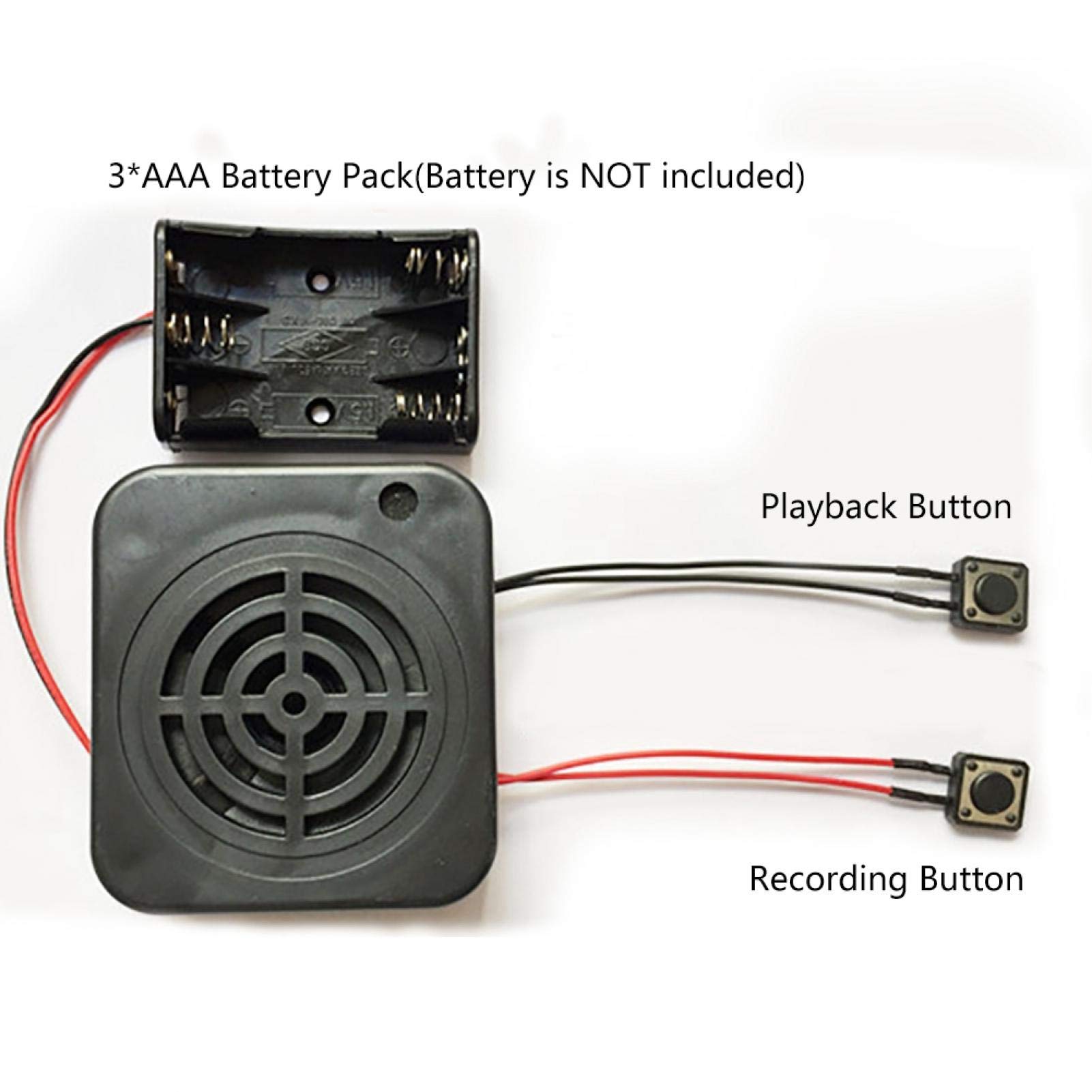
BulletPoint2 : ❤❤【2 Control Buttons】The red is used for recording, and the black is used for playback.Play : Press the to start playing the recorded sound (black with line).Record : red with line.
BulletPoint3 : ❤❤【Function】The sound quality is clear and the sound is louder, reaching 3W.Support ultra-long recording, up to 2/4 minutes, far superior to similar products.
BulletPoint4 : ❤❤【Application】Wide range of applications: recording toys, gift boxes, creative crafts, confession artifacts, advertising, etc.
BulletPoint5 : ❤❤【Tip】Any questions,Please feel us,we will provide you with high quality after-sales service.
Color : 2mins
CompatibleDevices : Personal Computer
CompatibleDevices1 : Earphone
CompatibleDevices2 : Laptop
CompatibleDevices3 : Smartphone
CompatibleDevices4 : MP3 Player
ExternallyAssignedProductIdentifier1 : 707300043422
ExternallyAssignedProductIdentifier10 : 09120056503155
ExternallyAssignedProductIdentifier2 : 0707300043422
ExternallyAssignedProductIdentifier3 : 9120056500901
ExternallyAssignedProductIdentifier4 : 9120056503155
ExternallyAssignedProductIdentifier5 : 0640206586788
ExternallyAssignedProductIdentifier6 : 5052184008872
ExternallyAssignedProductIdentifier7 : 4055325694188
ExternallyAssignedProductIdentifier8 : 05052184008872
ExternallyAssignedProductIdentifier9 : 09120056500260
Format : mp3_audio
HardwareInterface : 3_5_mm_audio
Hazmat1 : MANUAL GROUNDING
Hazmat10 : DE_NoAir
Hazmat11 : EG_NoAir
Hazmat12 : ES_NoAir
Hazmat13 : FR_NoAir
Hazmat14 : GB_NoAir
Hazmat15 : IN_NoAir
Hazmat16 : IT_NoAir
Hazmat17 : JP_NoAir
Hazmat18 : MX_NoAir
Hazmat19 : NL_NoAir
Hazmat2 : UN9999
Hazmat20 : PL_NoAir
Hazmat21 : SA_NoAir
Hazmat22 : SE_NoAir
Hazmat23 : SG_NoAir
Hazmat24 : TR_NoAir
Hazmat25 : US_NoAir
Hazmat26 : ZA_NoAir
Hazmat27 : ZA_SmallLithiumIonBatteryWithEquipment
Hazmat28 : 9
Hazmat3 : 3
Hazmat4 : AE_NoAir
Hazmat5 : AU_NoAir
Hazmat6 : BE_NoAir
Hazmat7 : BR_NoAir
Hazmat8 : CA_NoAir
Hazmat9 : CN_NoAir
HeadphonesJack : 3.5 millimeters
IncludedComponents1 : 1*Main Unit
IncludedComponents2 : 1*Earphones
IncludedComponents3 : 1*Type-C Cable
IncludedComponents4 : 1*User Manual
IncludedComponents5 : 1*OTG
IncludesRechargableBattery : 1
ItemName : Voice Recording Greeting Module,Voice Recording Playback Module Sound Recording Chip DIY Card, Recording Box Sound Chip Module DIY Music Audio Cards for Kids Gift Toy(2mins)
ItemPackageDimensions_Height : 14 centimeters
ItemPackageDimensions_Length : 3 centimeters
ItemPackageDimensions_Width : 9 centimeters
ItemPackageQuantity : 1
ItemTypeKeyword : digital-voice-recorders
Manufacturer : ASHATA
MemoryStorageCapacity : 8 GB
MicrophoneFormFactor : Built-In
MicrophoneOperationMode : Mono
ModelName : FBA_DPM6700
ModelNumber : RRUi5ksw73tg1xdq360-01
NumberOfItems : 1
NumberOfLithiumIonCells : 1
PackageLevel : unit
PartNumber : RRUi5ksw73tg1xdq360-01
ProductDescription : Specification:
Type: DIY Recording Box
Recording playback time: 2 minutes / 4 minutes (Optional)
Battery pack: 3 * 1.5V AAA batteries (NOT Included)
Play : Press the to start playing the recorded sound (black with line)
Record : red with line
Power cable length: Approx. 130MM
Recording box size: Approx. 68 * 61 * 25MM
Package list:
1 * Recording Box
Note:
1. Please note that there is NO battery in the package.
2. Please allow slight error due to manual measurement.
3. Different monitor colors may be different. Thanks for your kind understanding.
Instructions:
Q1. How to record?
A: Recording and playback operations:
Press the recording , hear the "DI" sound to release the recording , then speak to the microphone within 5-10 cm to start recording, press the recording again, hear the "DIDI" sound then release the recording , indicating the recording is completed. Then press the play again to play the currently recorded sound. During the playback process, press the play again to stop playing the sound.
Q2. If we recorded the wrong voice, can we re-record it?
A: Yes, you can press the record to re-record.
Q3. How to delete the recording?
A: Press and hold the record , do not record, when you hear the "DI" sound, release your hand. Then press the record to re-record.
4. The with the red wire is the recording , and the with the black wire is the playback .
ProductSiteLaunchDate : 2019-08-10T03:21:12.325Z
StreetDate : 2023-06-01T00:00:01Z
Style : 32GB
SupplierDeclaredDgHzRegulation : not_applicable
SupplierDeclaredHasProductIdentifierExemption : 1
UnspscCode : 55111500
WarrantyDescription : 1 Year
