
Cart 2 india


In2Cart
Rs. 0

0



Product Information
Specification
Brand : Pilipane
BulletPoint : GRADE A REFURB TESTED WITH REPORT
BulletPoint1 : [High Quality Plastic Shell] Made of high quality plastic shell , lightweight and long-lasting , easy to carry .
BulletPoint2 : [USB Transfer Design] Use a normal USB flash drive as the medium for transfer , no additional driver required , powered directly from the USB port , compatible with USB . Easy to install .
BulletPoint3 : [Multi Functional Floppy Disk Drive] It can read , store data , and format if necessary .
BulletPoint4 : [For Musical Keyboard] This floppy disk drive emulator is great for electronic organ and other musical keyboards .
BulletPoint5 : [Easy Installation] With a 34 pin floppy disk drive interface and 5V DC power plug , it is easy to install .
Color : default
Color1 : Green
Color2 : Black
CompatibleDevices : Desktop
ConnectivityTechnology : USB
DataTransferRate : 80 megabytes_per_second
FormFactor : 3.5-inch
HardDiskFormFactor : 3.5 inches
HardwareInterface : sas
InstallationType : External Hard Drive
ItemName : Pilipane 3 5 inch 1000 Floppy Disk Drive USB Emulator for Musical Keyboard Plastic Shell with USB Transfer Design, No Additional Driver Required
ItemPackageQuantity : 1
ItemTypeKeyword : computer-floppy-and-tape-drives
Manufacturer : Pilipane
ModelName : EH848A
ModelNumber : EH848A
NumberOfItems : 1
PartNumber : Pilipane2oxughpezw
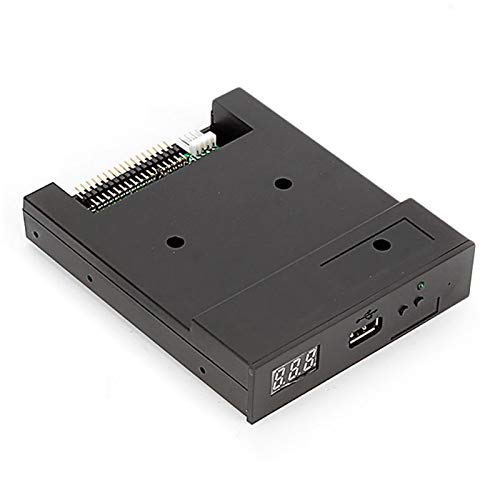
ProductDescription : Product Features:
100% Brand New
Item's color might be different from the picture because of the aberration.
This floppy drive emulator is great for electronic organ
Housing Material:ABS
Color:Black
Floppy driver with below function needed:
Floppy driver with 34pin interface,and 5V DC power plug
Use 2HD flpppy disk with 1.44MB capacity
Format of disk:Cylinders:80
Tracks:160 Sectors/Track
18 Bytes/Sector:512 Data
Transfer rate:500 kbps
Encoding method:MFM
Panel:
8segment numbers:represent partitions number
Green led:status of read and write operation
USB port:connect usb flash drive
Button:
Left button used to rise ten-digit,right botton used to rise single-digit,press 2 button together to
rise hundred-digit
Operation :
Format usb flash drive.
1.use built-in self-format function to format usb flash drive into 1000pcs partitions
2.install an emulator on computer,and format every partitions by operate driver A.
3.use emulator UFA1M44-100,plug usb flash drive on it,
connect to computer,it will recognized as removabe driver A or B under for WINDOWS XP/2000/7,format every partitions.
UFA1M44-100 also built in self-format function.
Read and write data.
1.install emulator on machine
2.install emulator on computer
3.connect usb flash drive on computer,read and write data directory by software, under for WINDOWS XP/2000
4.use emulator UFA1M44-100,plug usb flash drive on it, connect to computer,read and write data under for WINDOWS XP/2000/7.
Package Include:
1x USB Emulator
ProductSiteLaunchDate : 2023-07-19T11:13:48.089Z
SupplierDeclaredDgHzRegulation : not_applicable
SupplierDeclaredHasProductIdentifierExemption : 1
UnspscCode : 43200000
WarrantyDescription : 30 DAYS
WriteSpeed : 500.0 megabytes_per_second
