
Cart 2 india


In2Cart
Rs. 0

0


Product Information
Specification
AgeRangeDescription : Adult
AudioDriverType : dynamic_driver
AudioSensitivity : 87 decibels
Brand : VOICEPING
BulletPoint1 : USB C - Push To Talk Earpiece with PTT button and USB C connector. Supports most Android Smartphones. Supports iPhones with USB C (iPhone 15 and newer) and Walkie talkie Apps. L-shaped USB C to prevent accidental removal.
BulletPoint2 : True Push To Talk - Unlike normal 3.5mm earpieces which works in Toggle mode, this is True Push To talk. Press to Talk, release and it stops. No more accidental jamming or hot mic.
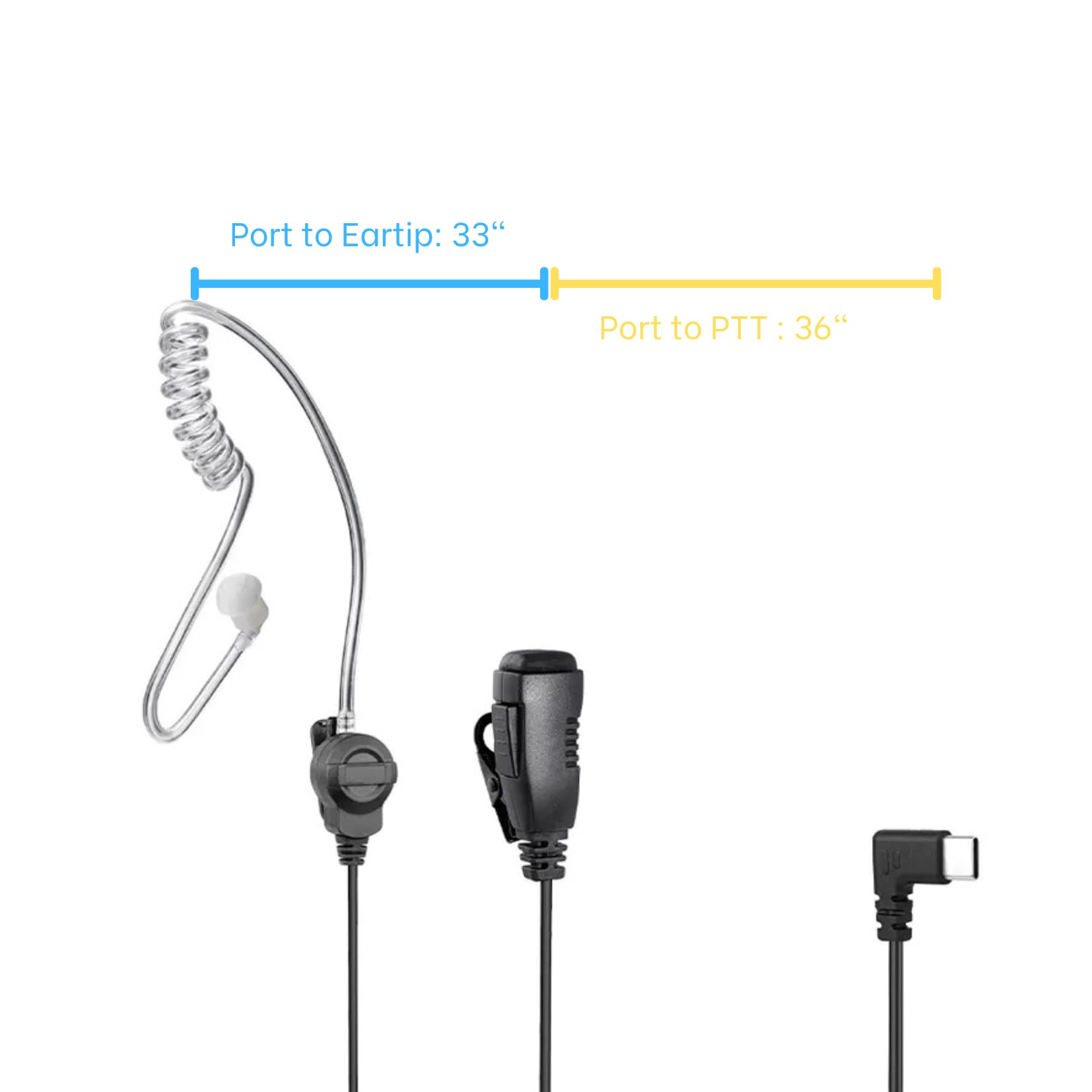
BulletPoint3 : Two Wire Design - 1 Meter from USB Type C connector to listening airtube. One Side Airtube Earpiece, 1x natural color earpiece.
BulletPoint4 : PTT button - Reliable & rated for 100,000 presses. Equivalent to 133 presses per work hour. 90 day warranty and replacement.
BulletPoint5 : App Tested: Zello, VoicePing, MS Teams, Unity Intercom. Other PTT apps might work too. Due to the variety of Android & Walkie Talkie Apps, we suggest that you purchase one for TESTING first before making a larger purchase. Samsung phones generally work. iPhone 15 and newer supported. DOES NOT WORK: Relay X, Zello Radios that are not smartphones, Phone call Pickup.
Color : Black
CompatibleDevices : Cellphones
CompatibleDevices1 : XTS5000
CompatibleDevices2 : XTS2500
CompatibleDevices3 : XTS1500
ConnectivityTechnology : Wired
ConnectorGender : Male-to-Male
ConnectorType : 3.5 mm Jack
ConnectorType1 : Motorola Radio cable
ConnectorType2 : 3.5MM audio jack in connection cable
ControllerType : Button
ControlMethod : touch
ControlType : Media Control
EarpieceShape : Rounded Tip
ExternallyAssignedProductIdentifier : 00748091005336
ExternallyAssignedProductIdentifier1 : 197644895663
ExternallyAssignedProductIdentifier2 : 0197644895663
HeadphonesEarPlacement : in_ear
HeadphonesFormFactor : In Ear
HeadphonesJack : USB C
Impedance : 16 ohm
IncludedComponents : yaesu vx 6r speaker microphone
IncludedComponents1 : Ear Buds
IncludedComponents2 : Eartip
IncludedComponents3 : Cable
IndoorOutdoorUsage1 : outdoor
IndoorOutdoorUsage2 : indoor
InternationalProtectionRating : IP56
ItemName : VOICEPING PTT Earpiece USB C - Earbuds with PTT Button and Mic (for Teams, Zello, and Other Walkie Talkie Apps on Android/iOS Smartphones)
ItemPackageDimensions_Height : 13.9954 centimeters
ItemPackageDimensions_Length : 2.2098 centimeters
ItemPackageDimensions_Width : 8.7884 centimeters
ItemPackageQuantity : 1
ItemShape : Round
ItemTypeKeyword : two-way-radio-headsets
Language : unqualified
Manufacturer : VOICEPING
Material : Polyurethane (PU)
MicrophoneFormFactor : Handheld
ModelName : PTT 1C
ModelNumber : VPPTT1C
NoiseControl : none
NoiseLevel : 85 decibels
NumberOfChannels : 1
NumberOfItems : 1
NumberOfPins : 5
PartNumber : 860007490750
PolarPattern : Omnidirectional
PowerSourceType : Battery Powered
ProductDescription :
- For Zello support, please setup in Zello App
1. Insert "VoicePing PTT Earpiece USB C" to the USB C Port of your ANDROID smartphone
2. Open Zello ANDROID app
3. Tap open the App Menu icon (3 vertical dots)
4. Select Options
5. Select Push-to-talk buttons
6. Tap the Add (+) icon at the bottom right corner
7. When prompted, give the PTT Button of "VoicePing PTT Earpiece USB C" a short quick press.
8. After successful setup, "USB PTT headset" should appear and described as "Hold to talk" mode.
9. Select a channel. Try to PTT via "VoicePing PTT Earpiece USB C"
10. Lock the phone and off the screen. Then try to PTT again.
- Troubleshooting
- Try to re-plug the USB C
- Verify that USB PTT Headset appears and it is in Hold To Talk Mode
- Verify that a channel is selected before you exit Zello or off the screen.
ProductSiteLaunchDate : 2023-09-22T00:49:31.758Z
RecommendedUsesForProduct : Radio communication
RecommendedUsesForProduct1 : Speech
RecommendedUsesForProduct2 : Video Conference
SignalToNoiseRatio : 78 decibels
Size : Universal
SpecificUsesForProduct : Professional
Style : [PO] In-ear
SubjectCharacter : Walkie Talkie
SupplierDeclaredDgHzRegulation : not_applicable
SupplierDeclaredDgHzRegulation1 : not_applicable
SupplierDeclaredDgHzRegulation2 : not_applicable
SupplierDeclaredDgHzRegulation3 : not_applicable
SupplierDeclaredDgHzRegulation4 : not_applicable
SupplierDeclaredDgHzRegulation5 : not_applicable
SupplierDeclaredHasProductIdentifierExemption : 1
SystemRequirements : Android with USB Type C
TalkRangeMaximum : 10 kilometer
TargetGender : unisex
TunerTechnology : VHF and UHF
UnitCount : 1
UnspscCode : 43191510
WarrantyDescription : 1 Year Manufacturer Warranty
WaterResistanceLevel : not_water_resistant
WirelessCommunicationTechnology : Wired
