
Cart 2 india


In2Cart
Rs. 0

0


Product Information
Specification
AgeRangeDescription : little_kid
Brand : BearHoHo
BulletPoint1 : Find flashing pattern of the lantern light to get the password and run away the escape room
BulletPoint2 : Support users to set password, and it is easy to set password, step by step with user manual.
BulletPoint3 : There are sound and music prompt, built in Micro SD card, easy to modify the sound files.
BulletPoint4 : With a lantern style, it can be integrated into a variety of decorative scenes.
BulletPoint5 : The password clue can be displayed repeated, when a set of passwords is displayed, the light returns to the constant light mode. After one round of flashing lights, press the trigger button again to trigger the flashing lights again.
Color : White-Nebula
ControlMethod : remote
EducationalObjective : 1
ExternallyAssignedProductIdentifier1 : 0765257698966
ExternallyAssignedProductIdentifier2 : 765257698966
FinishType : Matte
Hazmat1 : LITHIUM ION BATTERIES CONTAINED IN EQUIPMENT
Hazmat10 : CN_SmallLithiumIonBatteryInEquipment
Hazmat11 : DE_SmallLithiumIonBatteryInEquipment
Hazmat12 : EG_SmallLithiumIonBatteryInEquipment
Hazmat13 : ES_SmallLithiumIonBatteryInEquipment
Hazmat14 : FR_SmallLithiumIonBatteryInEquipment
Hazmat15 : GB_SmallLithiumIonBatteryInEquipment
Hazmat16 : IE_SmallLithiumIonBatteryInEquipment
Hazmat17 : IN_SmallLithiumIonBatteryInEquipment
Hazmat18 : IT_SmallLithiumIonBatteryInEquipment
Hazmat19 : JP_SmallLithiumIonBatteryInEquipment
Hazmat2 : UN3481
Hazmat20 : MX_SmallLithiumIonBatteryInEquipment
Hazmat21 : NL_SmallLithiumIonBatteryInEquipment
Hazmat22 : PL_SmallLithiumIonBatteryInEquipment
Hazmat23 : SA_SmallLithiumIonBatteryInEquipment
Hazmat24 : SE_SmallLithiumIonBatteryInEquipment
Hazmat25 : SG_SmallLithiumIonBatteryInEquipment
Hazmat26 : TR_SmallLithiumIonBatteryInEquipment
Hazmat27 : US_SmallLithiumIonBatteryInEquipment
Hazmat28 : ZA_SmallLithiumIonBatteryInEquipment
Hazmat3 : II
Hazmat4 : 9
Hazmat5 : AE_SmallLithiumIonBatteryInEquipment
Hazmat6 : AU_SmallLithiumIonBatteryInEquipment
Hazmat7 : BE_SmallLithiumIonBatteryInEquipment
Hazmat8 : BR_SmallLithiumIonBatteryInEquipment
Hazmat9 : CA_SmallLithiumIonBatteryInEquipment
IncludedComponents : Bulb included
ItemName : BearHoHo Room Escape Game Password Clues Props Lantern Light Flashing Prompt Escape Room Key to Run Away Adventure Room
ItemPackageDimensions_Height : 23.9 centimeters
ItemPackageDimensions_Length : 11.6 centimeters
ItemPackageDimensions_Width : 12.4 centimeters
ItemShape : Cylinder
ItemTypeKeyword : childrens-lamps-and-lighting
Manufacturer : BearHoHo
ManufacturerMinimumAge : 180
Material : Plastic
ModelName : Astronaut Space Projector
MountingType : Freestanding
NumberOfItems : 1
NumberOfLightSources : 1
NumberOfLithiumMetalCells : 1
OperationMode : Manual
PartNumber : 55T7707Y1K63764U
PowerSourceType : Battery Powered
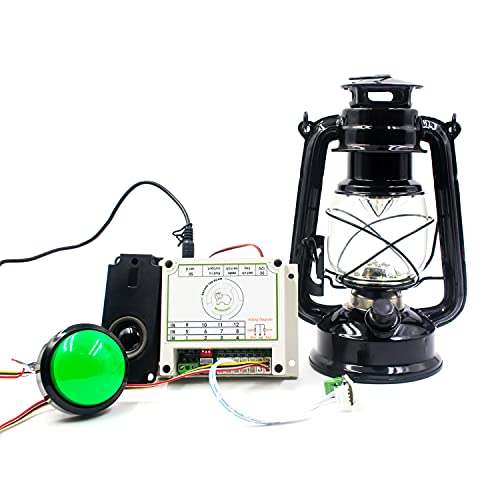
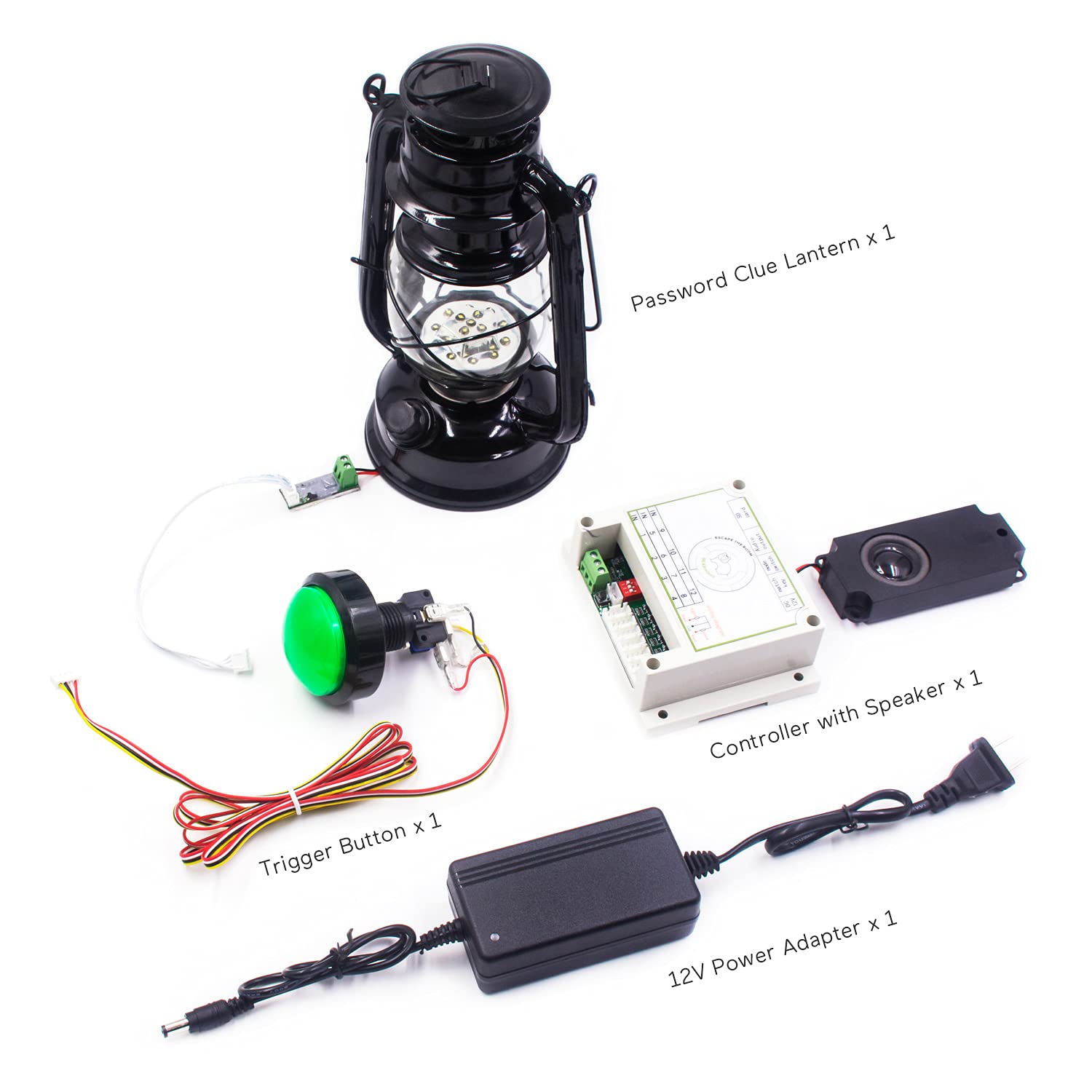
ProductDescription : This is a password clue props, the controller is connected to the power supply, the LED lantern and the trigger button need to be inserted in a fixed position, the position cannot be changed at will, and it can be integrated into a variety of decorative scenes.
HOW TO PLAY
Players need to find the lantern and the trigger button in the escape room, then press the button to observe the pattern of lantern flashing to find the password, and run away from the room.
MODIFY THE PASSWORD
1. Connect the plastic button and the lantern to the controller at first, the button must be inserted at the first position on the right side of the controller, and the lantern must be inserted at the second position.
2. Then power on the controller.
3. Press the setting button once, there will be a "DIDI" sound, and also you can hear a voice prompt. Listen to the voice prompt and wait for the voice prompt to end, it comes into the password configuration mode.
4. Press the setting button to set the password, just press a few times as same as the number that you want to set, the max is 40, after that there will be a “DI” beep, and then you can set the next number like that, at last wait for four "DI" beeps to complete the setting.
5. Wait for 10 seconds or repower the controller to restart, it comes into play mode.
6. Press the trigger button to start the prop, after a period of weird music, the lamp will flash regularly according to the set password, and that is the clue of the password.
HOW TO RESET
After one round of flashing lights, press the trigger button again to trigger the flashing lights again.
PACKING LIST
1 x Controller
1 x 12V Power Adapter
1 x Password Clue Lantern
1 x Trigger Button
1 x User Manual
ProductSiteLaunchDate : 2021-09-17T07:55:06.313Z
Size : 8.5*8.5cm
Style : Modern
SupplierDeclaredDgHzRegulation : not_applicable
SupplierDeclaredHasProductIdentifierExemption : 1
TargetAudienceKeyword1 : adults
TargetAudienceKeyword2 : adults
TargetAudienceKeyword3 : adults
TargetGender : unisex
Theme : 1
UnitCount : 1
UnspscCode : 39120000
Voltage : 3 volts_of_direct_current
WarrantyDescription : One year warranty.
