
Cart 2 india


In2Cart
Rs. 0

0



Product Information
Specification
AdditionalProductInformation : TV Stand, User Manual, Remote Control
AnalogAudioOutputCount : 2
AnnualEnergyConsumption : 40 watts
AspectRatio : 16:9
AudioEncoding : dolby_digital
AudioInput : RCA
AudioInput1 : USB
AudioInput2 : HDMI
AudioOutputMode : Stereo
BaseDepth : 1.8 inches
BatteriesIncluded : 1
BatteriesRequired : 1
Brand : Channel Master
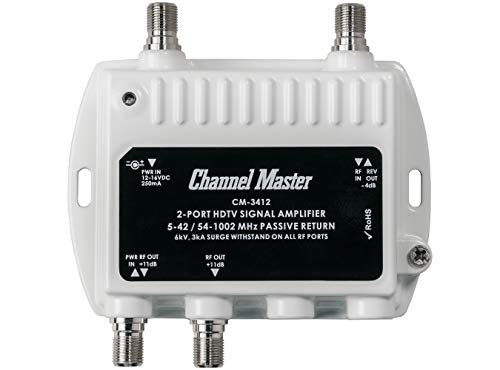
BulletPoint1 : Two Amplified Output Ports (Gain: 11.5 dB)
BulletPoint10 : Same Performance required by the major cable television companies
BulletPoint2 : Works with all TV Antennas & CATV Installations (Not Compatible with Satellite)
BulletPoint3 : Improves Signal Strength, Decreases Pixelation and May Increase Number of Channels
BulletPoint4 : Miniature Size for Space-Saving Installations
BulletPoint5 : Powder Coated and Weather-Sealed Housing Allows for Indoor or Outdoor Installation in any Climate
BulletPoint6 : 2-way digital distribution amplifier
BulletPoint7 : Professional Grade Performance
BulletPoint8 : Meets US and international standards
BulletPoint9 : Use with all F type fittings
Color : White
CompatibleDevices : Television
CompatibleDevices1 : Gaming Console
CompatibleDevices2 : Projector
CompatibleDevices3 : Monitor
CompatibleDevices4 : Laptop
CompatibleDevices5 : Television
ConnectivityTechnology : Wi-Fi
ConnectivityTechnology1 : USB
ConnectivityTechnology2 : HDMI
ConnectivityTechnology3 : VGA
ConnectivityTechnology4 : DVD
ConnectivityTechnology5 : RF
ConnectorGender : Female-to-Female
ConnectorType : HDMI
ConnectorType1 : HDMI
ConnectorType2 : USB
ContentSharingDirection : mobile_to_tv
ControllerType : Remote Control
ControlMethod : remote
ExternallyAssignedProductIdentifier1 : 020572034128
ExternallyAssignedProductIdentifier2 : 0020572034128
ExternallyAssignedProductIdentifier3 : 00020572034128
FormFactor : TV Box
HardwareInterface1 : usb
HardwareInterface2 : hdmi
HardwareInterface3 : vga
HardwareInterface4 : usb_streaming
ImageAspectRatio : 16:9
ImageContrastRatio : 1000:1
IncludedComponents : Power Supply, 6ft Coaxial Cable Jumper, Instruction Sheet
IncludedComponents1 : Apple TV 4K Wi-Fi
IncludedComponents2 : Apple Siri Remote (3rd Generation)
IncludedComponents3 : Power Cord
IncludedComponents4 : Apple 1 Year Limited Warranty
IncludedComponents5 : HDMl Extension Cord
IntegratedSurroundSoundFormat : Dolby Digital
IsAssemblyRequired : 1
ItemName : Channel Master Ultra Mini 2-2-Port TV Antenna Distribution Amplifier, 11.5dB gain, Compatible with Non-Amplified TV Antennas, Cable and Internet Modems, Increases Signal Strength, Indoor/Outdoor
ItemPackageDimensions_Height : 21.59 centimeters
ItemPackageDimensions_Length : 6.096 centimeters
ItemPackageDimensions_Width : 13.208 centimeters
ItemPackageQuantity : 1
ItemShape : Round
ItemTypeKeyword : satellite-tv-signal-amplifiers
ItemWeightWithoutStand : 15.4 pounds
Language : english
LineVoltage : 100_240_vac_50_60_hz
Manufacturer : Channel Master
Material : Aluminum
MaximumDisplayBrightness : 200 nit
MaximumOperatingDistance : 394 inches
MfgWarrantyDescriptionLabor : For warranty information about this product, please visit us at: http://westinghouseelectronics.com/support/warranty/
ModelName : SM03
ModelNumber : CM-3412
ModelSeries : HD
ModelYear : 2024
MotionEnhancementTechnology : Progressive Scan
MountingType : Tripod Mount
NumberOfBoxes : 1
NumberOfChannels : 1
NumberOfItems : 1
OperatingSystem : Android
OperatingTemperature : -40 degrees_celsius
OutputWattage : 60 watts
PackageLevel : unit
ParentalControlTechnology : V-Chip
PartNumber : CM-3412
PictureQualityEnhancementTechnology : LED
PowerConsumption : 50 watts
ProductDescription : The ORLN'K Mount for Starlink Mini Tripod Adapter is a versatile and sturdy accessory designed for seamless integration with the Starlink system. Crafted from high-quality aluminum alloy, this mount offers exceptional durability and strength. With its 1/4" threaded options, it provides compatibility with a wide range of tripods and mounting solutions. The positioning design allows for precise adjustment and optimal alignment, ensuring a stable and secure setup. Additionally, the mount can be expanded to accommodate a tripod super clamp fixation, offering enhanced versatility and adaptability. Whether you're setting up your Starlink system indoors or outdoors, this mount delivers reliable support and convenience.
ProductSiteLaunchDate : 2009-02-02T14:39:20-00:00
RealAngleOfView : 178 degrees
RecommendedUsesForProduct : Home Viewing
RecommendedUsesForProduct1 : TuTu 32-Inch Non-Smart LED TV-DVD Combo User Guide I. Basic Installation and Connections 1. Installing TV Stands Take out the two TV stand components from the package. Refer to the installation instructions in the user manual and firmly attach the stands to the corresponding slots at the bottom of the TV. Ensure that the stands are securely installed to prevent the TV from tipping over when placed. 2. Power Connection Use the power cord provided in the package to plug the TV into a suitable power outlet. Make sure the voltage of the outlet matches the TV's rated voltage of 42 volts to ensure normal operation and electrical safety. 3. Device Connections HDMI Connection: If you want to connect gaming consoles, computers, streaming devices (such as Fire TV, Apple TV, Google TV, etc.), use an HDMI cable. Insert one end of the HDMI cable into one of the three HDMI ports on the TV (one of which is an HDMI (ARC) port supporting audio return channel), and the other end into the HDMI output port of the corresponding device. After connection, switch the signal source to the corresponding HDMI channel via the TV remote control to display the device's screen and output sound on the TV. VGA Connection: To use the TV as a computer monitor, connect the computer and the TV's VGA port with a VGA cable. After connection, switch the signal source on the TV to the VGA mode. Some computers may require manual adjustment of display settings to adapt to the TV's resolution (this TV supports resolutions such as 2K, 480p, 720p, HD). USB Connection: You can insert a USB storage device containing media files such as videos, music, and pictures into the TV's USB port. The TV can directly read and play the contents of the USB device. Select the USB mode in the TV's signal source menu to browse and play media files. Audio Connection: If you want to connect external speakers for better sound effects, you can use an optical fiber cable to connect the TV's optical audio port and the speaker's optical input port, or use a 3.5mm audio cable to connect the TV's headphone jack and the speaker's audio input port. After connection, you need to select the corresponding audio output device in the TV's audio settings.
RecommendedUsesForProduct2 : II. Using the DVD Player 1. Inserting a Disc Gently press the DVD tray eject button on the TV, place the DVD disc (supported formats include DVD, CD, CDR, CDRW, DVD+/- R, DVD+/- RW, VCD, SVCD) into the tray, ensuring the correct disc orientation. Then gently push the tray back in. 2. Playing Operations Use the TV remote control to press the "Source" or "Signal Source" button and select the "DVD" option. The TV will automatically recognize and start playing the disc. During playback, you can use the remote control to perform operations such as play, pause, fast forward, rewind, and chapter selection.
RecommendedUsesForProduct3 : III. Daily Usage Recommendations 1. Placement Location This TV is compact and lightweight, making it suitable for placement in offices, kids' rooms, kitchens, basements, garages, or RVs (a 12V inverter is required). It can be placed on a table or installed on the wall to save space. When choosing a placement location, avoid direct sunlight on the screen to prevent screen aging and reflection that may affect the viewing experience. Also, ensure good ventilation around the TV to avoid reduced lifespan due to poor heat dissipation. 2. Viewing Settings According to the viewing environment and personal preferences, you can enter the settings menu via the TV remote control to adjust parameters such as screen brightness, contrast, color saturation, and sharpness to achieve the best viewing effect. When watching different types of content (such as movies, TV shows, games, etc.), try different image modes to find the most suitable display effect for that content. 3. Usage for Children The TV is equipped with V-chip technology, allowing parents or guardians to set parental controls. Set a password and block content that is inappropriate for children based on program ratings. You can also check the parental guidelines for unfamiliar shows to ensure a healthy and suitable viewing experience for children.
RecommendedUsesForProduct4 : IV. Maintenance and Care 1. Cleaning the Screen Regularly use a soft, clean microfiber cloth to gently wipe the TV screen to remove dust and stains. Avoid using cleaning agents containing chemicals such as alcohol and ammonia, as they may damage the coating on the screen surface. 2. Long-Term Non-Use If the TV will not be used for a long time, it is recommended to unplug the power cord to save energy and prevent damage to the TV caused by voltage fluctuations. At the same time, store the TV in a dry and ventilated place to avoid damage to internal components due to moisture.
RecommendedUsesForProduct5 : RV Camper
RecommendedUsesForProduct6 : School
RefreshRate : 60 hertz
RemoteControlTechnology : Infrared
Resolution : 4k
ResponseTime : 2 milliseconds
ScreenSurfaceDescription : Matte
SignalFormat : Digital
Size : 1x3
SkipOffer : 1
SpeakerDescription : Bottom Side
SpeakersMaximumOutputPower : 10 watts
SpecificationMet : No
SpecificUsesForProduct : Home Viewing
SpecificUsesForProduct1 : Entertainment
SpecificUsesForProduct2 : Gaming
StreetDate : 2025-06-22T14:00:00.000Z
Style : 2-Port
SupplierDeclaredDgHzRegulation : not_applicable
SupplierDeclaredHasProductIdentifierExemption : 1
SupportedImageType1 : bmp
SupportedImageType2 : gif
SupportedImageType3 : jpeg
SupportedImageType4 : png
SupportedInternetServices1 : Netflix
SupportedInternetServices2 : Apple TV+
SupportedInternetServices3 : Live TV
SupportedInternetServices4 : YouTube
SupportedInternetServices5 : Google TV
SurroundSoundChannelConfiguration : 5.1
TotalAudioOutPorts : 1
TotalComponentInPorts : 6
TotalHdmiPorts : 2
TotalUsb20Ports : 1
TotalUsbPorts : 1
TotalVgaInPorts : 1
TotalVideoOutPorts : 2
TunerTechnology : ATSC
UnitCount : 1
UnspscCode : 43220000
VesaMountStandard : 200_x_200_mm
VideoCodec : H.265/HEVC, H.264/AVC
VideoEncoding : H.264, H.265/HEVC
VideoOutputResolution : 3840 x 2160 pixels
VideoPlaybackFormat : avi, ts, mpg, mkv, vob, mov, wmv, dat, MP4, tp, flv, m2ts, mpeg
ViewingAngle : 178 degrees
Voltage : 110 volts_of_alternating_current
WarrantyDescription : 12M
WarrantyType : Limited
WaterResistanceLevel : not_water_resistant
Wattage : 50
WirelessCommunicationTechnology : HDMI
