
Cart 2 india


In2Cart
Rs. 0

0




Product Information
Specification
Amperage : 3 amps
BatteriesIncluded : 1
Brand : BoxWave
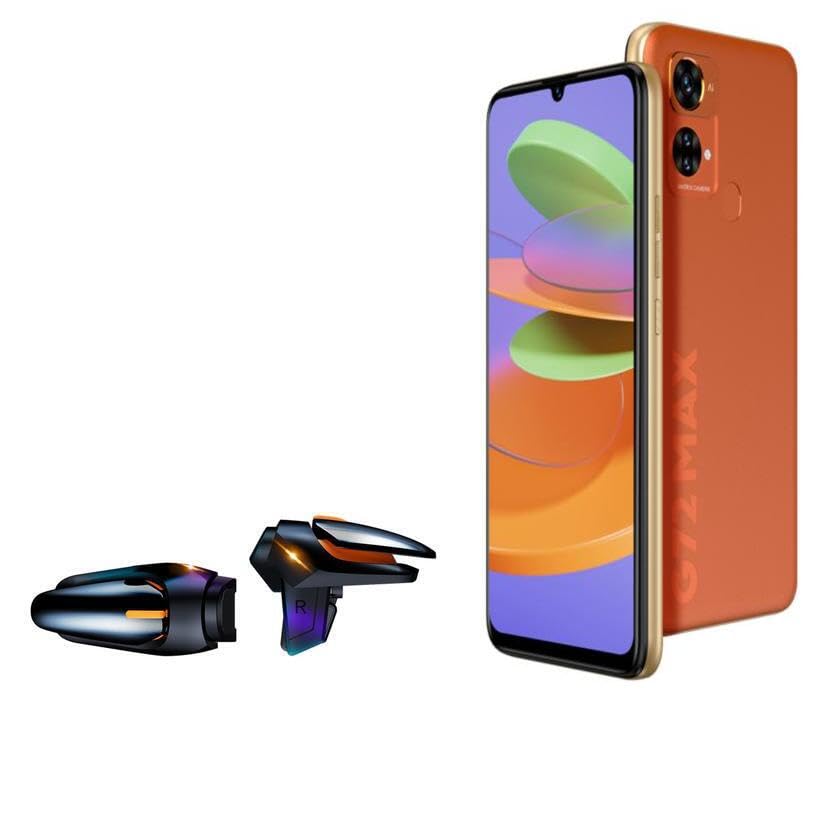
BulletPoint1 : 🎮 [Gaming Advantage] BoxWave Gaming Gear Compatible With BLU G72 Max. Auto Trigger technology enables COMPETITIVE dominance in mobile phone gaming. With a long lasting battery, tactile feel, and electronic "firing" pulses, gamers gain more focus and keep an edge over other players, longer. Simply optimize the button placement, and enlarge the thumb button area to start winning! **Please note this is for the left trigger only.**
BulletPoint2 : 🔫 [Game Compatibility] Best use for games like PUBG Mobile, Call of Duty Mobile, Fortnite Mobile and other mobile shooting games. QuickTrigger Auto boasts 4 settings with up to 64 CLICKS per second, offering more versatility to the player; allowing users to use non-automatic weapons as if they were automatic.
BulletPoint3 : ⚡ [Electronic] QuickTrigger Auto is equipped with pulse-touch technology, simply HOLD down left button for CONTINUOUS tapping. Charge and connect effortlessly! Eliminate trigger finger burnout, and the competition.
BulletPoint4 : 💼 [Convenient] EASILY CHARGE and snap-on for whenever you want to game, wherever. The QuickTrigger Auto boasts long battery life, powering you through even the toughest of sessions. Small enough to travel anywhere without bulk.
BulletPoint5 : 🔦 [How to use] 1. Put the joystick in from the top of your G72 Max, adjust it to the appropriate position, and hold the power button to start. 2. Choose the setting INTERFACE in the game, and move the firing icon and aiming icon to the functional touch point to play.
Color : Jet Black
CompatibleDevices : Smartphones
CompatiblePhoneModels : Apple iPhone 5
ConnectivityTechnology : USB
ConnectorGender : Male-to-Male
ConnectorType : USB
CurrentRating : 2 amps
CurrentRating1 : 3 amps
CurrentRating2 : 0.5 amps
CustomerPackageType : FFP
ExternallyAssignedProductIdentifier : 6409248982514
ExternallyAssignedProductIdentifier1 : 823895693795
ExternallyAssignedProductIdentifier2 : 0823895693795
Hazmat1 : UN1950
IncludedComponents : 20W Charging Block, 5 x Charging Cables
InputVoltage : 240 volts
IsPortable : 1
ItemFirmnessDescription : Medium
ItemName : BoxWave Gaming Gear Compatible with BLU G72 Max - Touchscreen QuickTrigger Auto, Trigger Buttons Autofire Gaming Mobile FPS - Jet Black
ItemPackageDimensions_Height : 35.814 centimeters
ItemPackageDimensions_Length : 7.62 centimeters
ItemPackageDimensions_Width : 17.78 centimeters
ItemPackageQuantity : 1
ItemShape : Round
ItemTypeKeyword : external-cell-phone-battery-packs
ItemTypeName : Bottle Brush
Manufacturer : BoxWave
Material : Polycarbonate
Material1 : Nylon
Material2 : Plastic
Material3 : Stainless Steel
ModelName : JB
ModelNumber : Mel-GDB-1
MountingType : Wall Mount
NumberOfBoxes : 1
NumberOfItems : 2
NumberOfPowerLevels : 1
OutputVoltage : 5 volts
PartNumber : bw-1970-38493-11740
PowerPlugType : type_a_2pin_na
PowerSourceType : Corded Electric
ProductDescription : BoxWave Gaming Gear Compatible With BLU G72 Max.
Auto Trigger technology enables COMPETITIVE dominance in mobile phone gaming. With a long lasting battery, tactile feel, and electronic "firing" pulses, gamers gain more focus and keep an edge over other players, longer. Simply optimize the button placement, and enlarge the thumb button area to start winning! **Please note this is for the left trigger only.**
Best use for games like PUBG Mobile, Call of Duty Mobile, Fortnite Mobile and other mobile shooting games. QuickTrigger Auto boasts 4 settings with up to 64 CLICKS per second, offering more versatility to the player; allowing users to use non-automatic weapons as if they were automatic.
QuickTrigger Auto is equipped with pulse-touch technology, simply HOLD down left button for CONTINUOUS tapping. Charge and connect effortlessly! Eliminate trigger finger burnout, and the competition.
EASILY CHARGE and snap-on for whenever you want to game, wherever. The QuickTrigger Auto boasts long battery life, powering you through even thetoughest of sessions. Small enough to travel anywhere without bulk.
1. Put the joystick in from the top of your G72 Max, adjust it to the appropriate position, and hold the power button to start. 2. Choose the setting INTERFACE in the game, and move the firing icon and aiming icon to the functional touch point to play.
ProductSiteLaunchDate : 2023-02-23T00:00:00.000-08:00
Size : Black
SpecificationMet : ETL
SpecificationMet1 : FCC
SpecificationMet2 : UL
SpecificUsesForProduct : Drain
SupplierDeclaredDgHzRegulation : not_applicable
SurfaceRecommendation : Sink
Theme : Kitchen
TotalUsbPorts : 1
UnitCount : 2
Wattage : 20 watts
