
Cart 2 india


In2Cart
Rs. 0

0


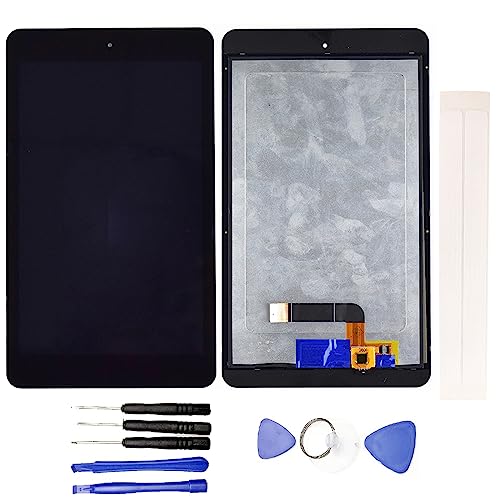

Product Information
Specification
Brand : JayTong
BulletPoint : Compatible With:L-G G Pad IV 8.0 FHD / F2 8.0 LK460.
BulletPoint1 : Brand New Replacement Part USA.
BulletPoint2 : Replacement for Samsung Galaxy Tab A 8.0 2019 SM-T290 LCD Display Touch Screen Assembly
BulletPoint3 : Please note installation can be difficult so we DO NOT recommend purchase if you are not a technician.
BulletPoint4 : This posting is created by JM International Inc.
BulletPoint5 : It is very important to TEST the LCD Before you install it
Color : Black
ExternallyAssignedProductIdentifier : 4963343111245
ExternallyAssignedProductIdentifier1 : 0791519877312
ExternallyAssignedProductIdentifier2 : 791519877312
IncludedComponents : For Fire HD 8/HD 8 Plus10th 2020 Touch digitizer
ItemName : JayTong LCD Display & Replacement Touch Screen Digitizer Assembly with Free Tools for L-G G Pad IV 8.0 FHD / F2 8.0 LK460 Black
ItemPackageDimensions_Height : 8 centimeters
ItemPackageDimensions_Length : 20 centimeters
ItemPackageDimensions_Width : 14 centimeters
ItemPackageQuantity : 1
ItemTypeKeyword : touch-screen-tablet-computer-replacement-screens
Manufacturer : JayTong
ModelNumber : L-G G Pad IV 8.0 FHD / F2 8.0 LK460.
NumberOfItems : 1
PartNumber : JY-ZC-5003
ProductDescription : Note:
- Replacing/repairing old, broken, cracked, damaged, touch is not working, touch response issues,non-functioned for LCD screen.
- We strongly suggest test the item received before installation, pls don't remove protective film or tags when testing;
Test steps:
1. clean the flex cable of screen and the slot of the motherboard before test;
2. connect new screen to the motherboard tightly;
3. make sure battery was charged fully, and pls also make sure your motherboard is not broken;
4. Power on ,tested finished.
Please be careful during the installation process. Any problems, please contact us in time. Do not force the installation. Thank you.
ProductSiteLaunchDate : 2021-01-07T08:12:23.639Z
Size : 8 Inches
SupplierDeclaredDgHzRegulation : unknown
UnspscCode : 43210000
WarrantyDescription : 6 Months
