
Cart 2 india


In2Cart
Rs. 0



Product Information
Specification
Brand : Arbilato
BulletPoint1 :
BulletPoint2 :
BulletPoint3 : ✨【How To Repair】Because there are so many models of mobile devices,it is difficult to provide detailed installation instructions for all products. You can go to Youtube website and search For Samsung Note 10.1 touch Panel to see the related installation instruction video.
BulletPoint4 :
BulletPoint5 :
Color : Black
ExternallyAssignedProductIdentifier1 : 0740379588661
ExternallyAssignedProductIdentifier2 : 740379588661
GpsrSafetyAttestation : 1
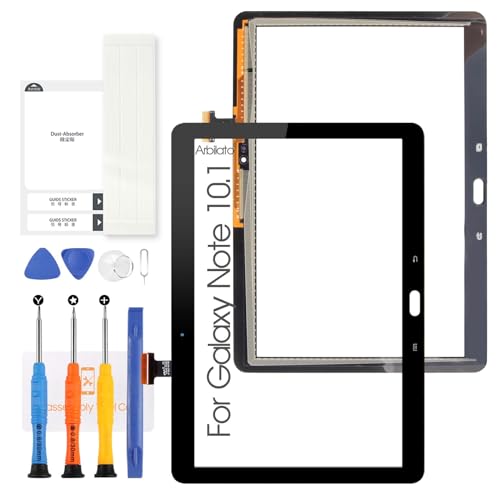
IncludedComponents : 1*LCD Screen,1*tools
ItemName : Screen for Samsung Galaxy Note 10.1 Screen Replacement for Samsung Note 10.1 Tablet Touch Screen GT-N8000,N8010,N8013 Touch Digitizer Repair Parts(No LCD (Black)
ItemPackageDimensions_Height : 1 inches
ItemPackageDimensions_Length : 1 inches
ItemPackageDimensions_Width : 1 inches
ItemPackageQuantity : 1
ItemTypeKeyword : touch-screen-tablet-computer-replacement-screens
Manufacturer : Arbilato
ModelNumber : SM-T830, SM-T835
NumberOfItems : 1
PartNumber : MLus4SMT830BKOAS
ProductDescription :
-Compatible With: For Samsung Galaxy Note 10.1 Screen Replacement (Black No LCD)
-Model Number: GT-N8000,N8010,N8013
-Size: 10.1 inches
-Resolution:800 x 1280 pixels
【Please Note】
▶ Correct installation requires special skills and techniques, you can go to the YouTube site to view the video to learn the installation method before trying
▶ It is highly recommended to find a professional to perform the replacement. We may not be responsible for any damage caused during the replacement process
▶ Unplug the battery connector and remove the battery before installation to avoid short circuit.
▶ Before installing the LCD, remove all the old glue in case it affects the new glue paste.
▶ If your case is in an unnatural state such as bent, please replace the case before replacing the LCD. Otherwise, the screen glass is likely to break
Before confirming your purchase, please verify the model number of your own device, and the correct shipping address. If you find any problems after receiving screen, after learning the specific situation, we will immediately solve the problem for you and provide suitable and effective solutions.
ProductSiteLaunchDate : 2024-01-24T09:46:22.096Z
SupplierDeclaredDgHzRegulation : not_applicable
UnspscCode : 43210000
WarrantyDescription : no warranty
