
Cart 2 india


In2Cart
Rs. 0

0


Product Information
Specification
Brand : RiToEasysports
BulletPoint1 : [HIGH-SPEED DATA TRANSFER] Experience data transfer rates of up to 1M/S with this PCI to Dual Serial DB9 RS232 adapter card.
BulletPoint2 : [WIDE COMPATIBILITY] Compatible with 2000/2003/ operating systems for maximum flexibility.
BulletPoint3 : [PLUG AND PLAY] Easy installation with automatic IRQ and I/O address allocation, making it a hassle- experience for users.
BulletPoint4 : [MULTI-PORT SUPPORT] One host can support multiple multi-serial cards, allowing for multiple connections at once.
BulletPoint5 : [ROHS COMPLIANT] This adapter card is RoHS compliant, ensuring it meets environmental standards for responsible manufacturing.
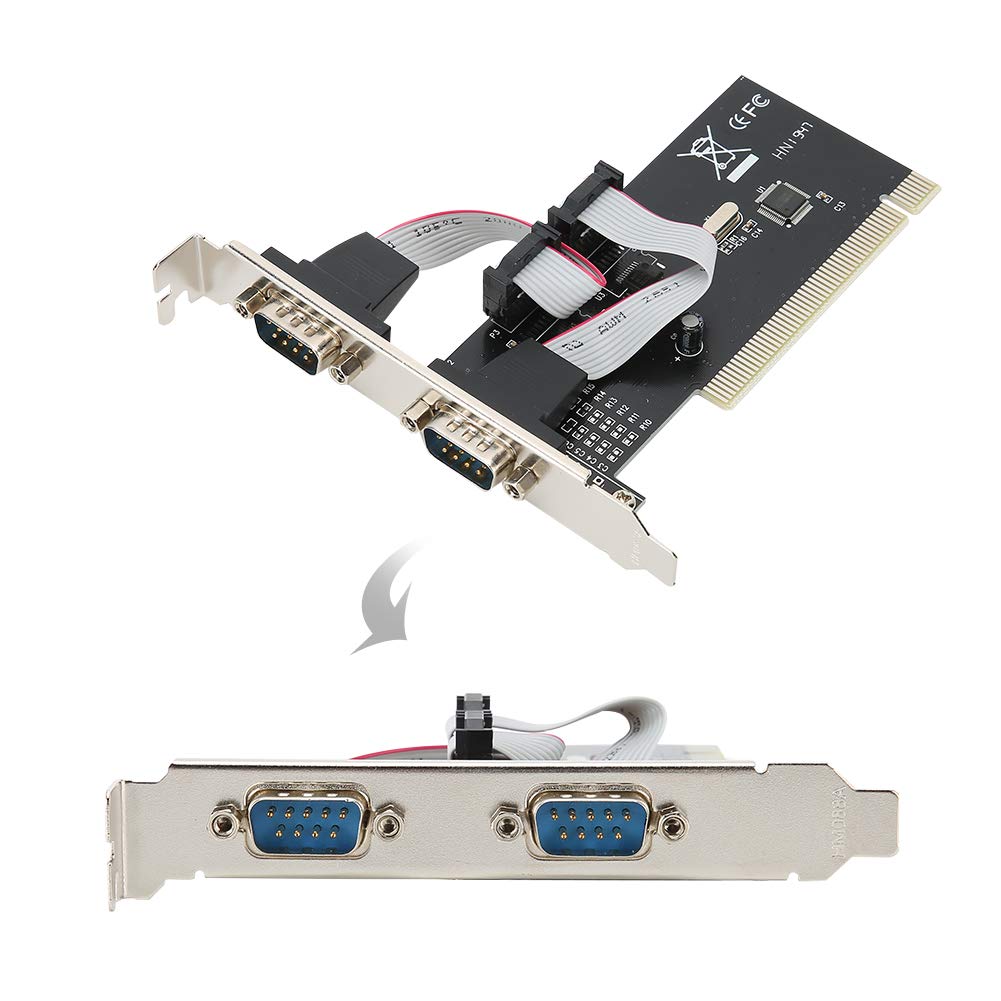
ItemName : PCI to RS232 Dual Serial DB9 Card, Maximum 1MS Data Transfer Rate, Suitable for Desktop Computers, Various Control Options
ItemPackageDimensions_Height : 4 centimeters
ItemPackageDimensions_Length : 17 centimeters
ItemPackageDimensions_Width : 14 centimeters
ItemTypeKeyword : computer-serial-port-cards
Manufacturer : RiToEasysports
ModelNumber : RiToEasysportscvoim9z4k7
NumberOfItems : 1
ProductDescription : 1. Compliant with PCI 2.1 specification, support 32-bit PCI bus. Plug and play, automatic allocation of IRQ and I / O address.
2. One host can support multiple multi-serial card. Data bit: 4, 5, 6, 7, 8 bytes.
3. Parity bit : NONE EVEN OLD SPACE . Stop bit : 1, 1.5, 2.
4. control: None, hardware, Xon / Xoff. Support 2000/2003 / operating system.
5. The maximum data transfer rate is up to 1M / S. RoHS compliant.
Spec:
Features:
Compliant with PCI 2.1 specification, support 32-bit PCI bus.
Plug and play, automatic allocation of IRQ and I / O address.
One host can support multiple multi-serial card.
Data bit: 4, 5, 6, 7, 8 bytes.
Parity bit : NONE EVEN OLD SPACE .
Stop bit : 1, 1.5, 2.
control: None, hardware, Xon / Xoff.
Support 2000/2003 / operating system.
The maximum data transfer rate is up to 1M / S.
RoHS compliant.
Specifications:
Color: Shown as the pictures
Package weight: 110g
Instruction:
Install a PCI to R232 expansion card on your computer:
1. Turn off the computer and the devices connected to the computer.
2. Open the chassis cover and insert the card into the PCI slot that is not in use and secure it.
3. Close the chassis cover and connect the wires of the PCI to R232 expansion card.
4. Start the computer, the step is driver installation.
Driver location: IO-PCI60806A 2S driver on the CD.
Install the 2000 / driver:
1. Start the system.
2. automatically detects the PCI to R232 expansion card. Click the "" to continue.
3. Select "From list or specify installation (recommended)" and click the "" .
4. Insert the drive CD in the CDROM. Select "Include this location (O) in the search:" and click the "Browse" to continue the installation.
5. In the folder browsing:
a. Select the CDROM drive.
b. the SIE folder.
c. the 60806A folder.
d. Click the "OK" .
e. Click the "" .
6. system will automatically find the file in the drive CD, click the "" to continue.
7. Click "Finish" to start copying files from the drive CD.
8. The system will automatically refresh the hardware configuration.
9. system reboot, PCI TO RS232 expansion card can be used.
10. After the program is finished, the system will restart automatically to complete the installation of the driver.
Package List:
1 x PCI to 2 Serial Port Card
1 x Drive CD
Note:
1. When the PCI to R232 expansion card is at self-test in PC, the system will prompt that there is a device.
2. Each PCI to R232 expansion card takes an interrupt, and it is automatically assigned by the system. The port number is determined by the PCI location.
3. In system, if the system does not install other similar products, the port is named generally from COM3, which is related to the motherboard COM port number.
4. In system, if you want to replace with the new card and the new driver, you must delete the original card from the "multi-function card".
5. Strictly prohibit inserting or pulling put the card / connecting cable when power on.
ProductSiteLaunchDate : 2025-05-20T03:41:23.388Z
SupplierDeclaredDgHzRegulation : not_applicable
SupplierDeclaredHasProductIdentifierExemption : 1
UnspscCode : 43201400
WarrantyDescription : manufacturer warranty for 90 day
