
Cart 2 india


In2Cart
Rs. 0

0


Product Information
Specification
AgeRangeDescription : Adult
AudioInput : Auxiliary
BatteriesIncluded : 1
BatteriesRequired : 1
Brand : JRGKJCP
BulletPoint1 : Download and Delete Music : The voice chips support download your own mp3 music, also record through MIC. You can connect to the computer to delete the built in music. Personalize your settings by adjusting the playback mode in the "config.txt" file. This allows you to achieve a personalized experience.
BulletPoint2 : 16 MB Storage Capacity : This sound module boasts a spacious 16MB memory, providing ample storage space to accommodate multiple favorite songs or recordings. By connecting the module to a computer using a USB-Micro cable, you can effortlessly add new audio files to the internal storage. This opens up a world of possibilities for your creativity, allowing you to easily modify and update the stored audio content according to your preferences and needs.
BulletPoint3 : USB Charging Recording Module : This recording module features a rechargeable design and is equipped with a big-capacity 3.7 V battery (110 mAh),fully charged takes approximately 90 minutes,played for about 120 minutes. It can be conveniently charged via the Micro USB-Type-C interface. This design extends the battery life, allowing for prolonged usage without the need for battery replacement. You can easily charge it by connecting it to a computer or using a charger, ensuring a full battery and enabling long-lasting usage with repeated charging cycles.
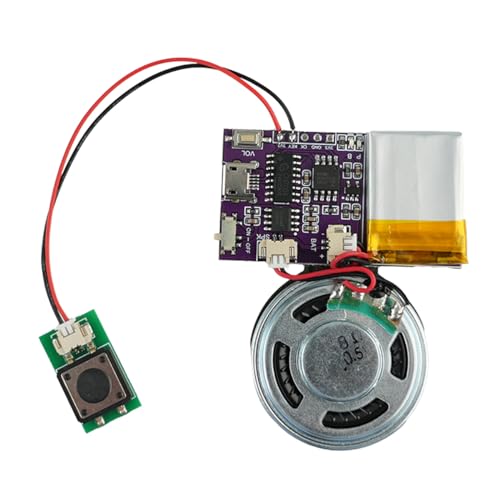
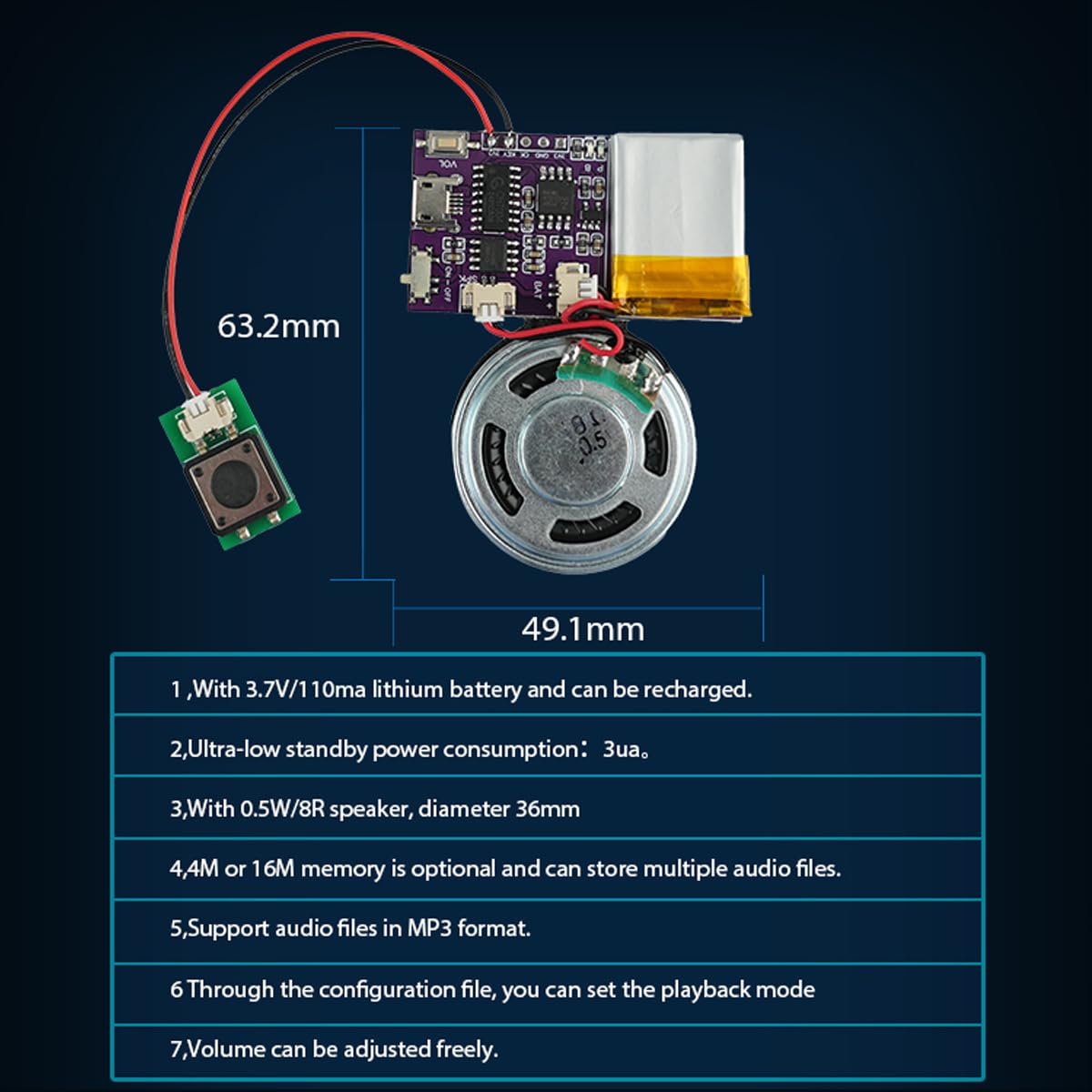
BulletPoint4 : Light and Portable : Multiplay recordable voice module card is lightweight (18 G), small (length, width 49.1mmX 63.2 mm), simple and easy to operate,can allows you to adjust the volume and features an ON OFF switch, ensuring the good listening experience. Enjoy full control over your audio creations with our voice recording module.
BulletPoint5 : Easy Installation : Back of the sound module is equipped with adhesive stickers. You simply need to stick it onto the surface of your greeting card, present box, or any other object, and it will securely attach to your creative creation. This way, you don't need any additional tools or materials to easily combine the sound module with your present, bringing surprise and joy to the recipient.
BulletPoint6 : After Sales Service : Please carefully read the user manual before Using. Any Question, please click GET HELP WITH ORDER under your order ID.We have own factory, Diverse style. Support customization Welcome to email us!
BulletPoint7 : Special feature: Portable and easy to use
BulletPoint8 : Input Voltage range of Oscillators = 0-10V
Color : Blue
CompatibleDevices : MP3 Player
CompatibleDevices1 : Desktop computers
CompatibleDevices2 : Apple Systems Computer
CompatibleDevices3 : Laptop
CompatibleDevices4 : Windows Systems Computer
CompatibleDevices5 : Mac Computer
ConnectivityTechnology : Auxiliary
ConnectorType : HDMI
CustomerPackageType : Standard Packaging
ExternallyAssignedProductIdentifier : 8859469901159
ExternallyAssignedProductIdentifier1 : 0738676134278
ExternallyAssignedProductIdentifier2 : 738676134278
ExternallyAssignedProductIdentifier3 : 0644216624904
FinishType : Unfinished
Format : mp3_audio
Format1 : digital
Format2 : gift_box
Format3 : mp3_audio
GpsrSafetyAttestation : 1
HardwareInterface : usb2.0_micro_a
Hazmat1 : LITHIUM ION BATTERIES CONTAINED IN EQUIPMENT
Hazmat10 : DE_SmallLithiumIonBatteryInEquipment
Hazmat11 : EG_SmallLithiumIonBatteryInEquipment
Hazmat12 : ES_SmallLithiumIonBatteryInEquipment
Hazmat13 : FR_SmallLithiumIonBatteryInEquipment
Hazmat14 : GB_SmallLithiumIonBatteryInEquipment
Hazmat15 : IE_SmallLithiumIonBatteryInEquipment
Hazmat16 : IN_SmallLithiumIonBatteryInEquipment
Hazmat17 : IT_SmallLithiumIonBatteryInEquipment
Hazmat18 : JP_SmallLithiumIonBatteryInEquipment
Hazmat19 : MX_SmallLithiumIonBatteryInEquipment
Hazmat2 : UN3481
Hazmat20 : NL_SmallLithiumIonBatteryInEquipment
Hazmat21 : PL_SmallLithiumIonBatteryInEquipment
Hazmat22 : SA_SmallLithiumIonBatteryInEquipment
Hazmat23 : SE_SmallLithiumIonBatteryInEquipment
Hazmat24 : SG_SmallLithiumIonBatteryInEquipment
Hazmat25 : TR_SmallLithiumIonBatteryInEquipment
Hazmat26 : US_SmallLithiumIonBatteryInEquipment
Hazmat27 : ZA_SmallLithiumIonBatteryInEquipment
Hazmat28 : 9
Hazmat3 : II
Hazmat4 : AE_SmallLithiumIonBatteryInEquipment
Hazmat5 : AU_SmallLithiumIonBatteryInEquipment
Hazmat6 : BE_SmallLithiumIonBatteryInEquipment
Hazmat7 : BR_SmallLithiumIonBatteryInEquipment
Hazmat8 : CA_SmallLithiumIonBatteryInEquipment
Hazmat9 : CN_SmallLithiumIonBatteryInEquipment
HeadphonesJack : #
IncludedComponents : #
IncludesRechargableBattery : 1
Instrument : Synthesizer
ItemName : JRGKJCP Sound Module,16MB Push Button Control Activated Vioce Chips, MP3 Music Sound Module for Crafts, Christmas,New Year Greeting Gifts Cards Box with Speaker Lithium Battery Powered and USB Cable.
ItemPackageDimensions_Height : 15.0876 centimeters
ItemPackageDimensions_Length : 2.3114 centimeters
ItemPackageDimensions_Width : 10.6934 centimeters
ItemPackageQuantity : 1
ItemTypeKeyword : sound-modules
Manufacturer : JRGKJCP
Material : pcb plate
Material1 : Metal
Material2 : Plastic
MaximumSupplyVoltage : 3.3 volts_of_direct_current
MemoryStorageCapacity : 16 MB
MicrophoneFormFactor : #
MicrophoneOperationMode : Mono
MinimumSupplyVoltage : 3.3 volts
ModelName : CH9300-FL Voice Module-5P+Horn
ModelNumber : JR-JX7004-B Sound Module
MountingType : Surface Mount
NumberOfBoxes : 1
NumberOfChannels : 3
NumberOfItems : 1
NumberOfLithiumIonCells : 110
OutputConnectorType : Auxiliary
PackageTypeName : Individual Component Packaging
PartNumber : JR-JX7004-B Sound Module
PowerSourceType : Corded Electric
ProductDescription : 3 Kinds Version
Push Button
The audio plays when the button is pressed. Freely set playing mode
Light Sensor
When there is light it play and when no light it stop playing.Freely set loop or no loop.
Magnet Sensor
Magnets move away from play and move closer to stop. Freely set loop,no loop
一、Features
1、With 3.7 V 110 ma lithium battery.
2、Ultra-low standby power consumption:3 ua。
3、With 0.5 W 8 R speaker, diameter 36mm
4、16M memory is optional and can store multiple audio files.
5、Support audio files in MP3 format.
Through the configuration file, you can set the playback mode .
二、USB Update Voice file
Connect the computer via the Android USB data cable, eject the "U disk", delete the old audio files, and copy the new audio files.
Note:
1. The audio file must be in MP3 format, and there is no requirement for the file name.
2. The "CONFIG.TXT" file in the USB flash drive must be retained, as it is used to set the playback mode.
ProductSiteLaunchDate : 2024-07-28T07:00:00.000Z
Size : 1.1X0.8in
SkillLevel : Beginner
StreetDate : 2019-10-31T00:00:01Z
Style : Voice Module+Horn
SupplierDeclaredDgHzRegulation : not_applicable
SupplierDeclaredDgHzRegulation1 : not_applicable
SupplierDeclaredDgHzRegulation2 : not_applicable
SupplierDeclaredDgHzRegulation3 : not_applicable
SupplierDeclaredDgHzRegulation4 : not_applicable
SupplierDeclaredDgHzRegulation5 : not_applicable
SupplierDeclaredHasProductIdentifierExemption : 1
SupportedSoftware : VCV Rack, Modular
UnitCount : 1
UnspscCode : 52161500
Voltage : 1 volts
WarrantyDescription : 2
